Posts

Showing posts with the label GIS6005

Final Project [GIS6005]: Conservation in the State of Florida: Preserving Key Habitats of the Striped Burrfish
Image
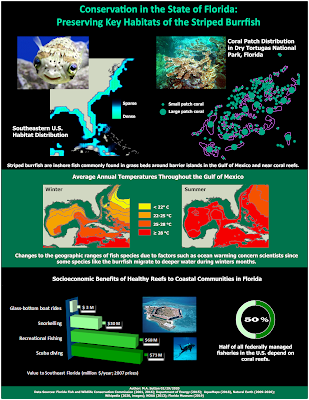
Striped burrfish are inshore fish known to exploit a wide range of depths. Although commonly found in grass beds around barrier islands in the Gulf of Mexico (Franks et al., 1972), they are also found near coral reefs (Robins, Ray, & Douglas, 1986), as well as in deeper waters during the winter months (Audubon Society, 2002). Changes to the geographic ranges of fish species due to factors such as ocean warming (Espino et al., 2019) are of concern to scientists. In addition, impacts to fish habitats in tourism-based states such as Florida are considered by economists given the socioeconomic benefits of commercial and recreational fishing to coastal communities (Lellis-Dibble, McGlynn, & Bigford, 2008). As one example of their impact, half of all federally managed fisheries in the U.S. depend on coral reefs (Burton, 2019). In addition, t he total value of coral reefs for southeast Florida was estimated in 2007 to be $174 million/year (Brander & van Beukering, 2013),...

Lab 6 [GIS6005]: Bivariate Choropleth Mapping

Image
The map above demonstrates the use of bivariate choropleth mapping to demonstrate patterns in the United States related to obesity and physical inactivity, as highlighted in the close-up of the legend provided here:  In order to prepare data for bivariate choropleth mapping, two related variables must first be normalized. In this example, the variables have been normalized using the population of each county.  Next, each variable must be independently classed into an appropriate number of bins. The quantile classification method was selected in the example above so that the data values for each of the variables were distributed in equal numbers across the data bins - this meant there were no bins with too few or too many data points. Three classes were selected for each variable in this example to intuitively align with low, medium, and high rates of of physical inactivity in a population, as well as low, medium, and high rates for obesity in a population. Th...

Lab 6 [GIS6005]: Proportional Symbol Maps for Positive and Negative Values

Image
This map uses proportional symbology to map positive and negative values. In order to achieve this within ArcGIS Pro, separate features classes representing positive ranges of values were created for the losses and for the gains.  When creating the final symbology for the two items, settings were then adjusted to make sure values noted in the legend were represented by similarly sized item on the map (i.e., same sized circle for 50K for jobs lost or jobs gained).  Finally, contrasting colors (green and orange) were then selected to help the reader visually compare states with losses and gains. A lighter border for the circles compared to the deeper shade in the interior was then used so the smallest sized items could be more easily discerned against the underlying layer with state borders, as shown in a close-up of the legend here:

Lab 5 [GIS6005]: Analytical Data

Image
Strategies employed when designing the final layout for this infographic included the following: Visual contrast: Lighter shades of blue and tan are used for areas with textual information to increase contrast with the black, blue, orange, and green fonts used in these areas. Additionally, the number of classes used for each choropleth map was selected to maximize the visual contrast between those counties with smaller percentages compared to those with large percentages. Legibility: The use of larger, bolded fonts for the “Don’t delay – get evaluated TODAY!” and “7 out of 10 diabetics have sleep disorders” textboxes was made to make these messages easily seen as the reader is scanning other supporting text provided in smaller or non-bolded fonts.  Figure-ground organization: The border around the center bar chart was thickened to make this visualization more prominent, as it demonstrates how one state (Alabama) has the three highest ranked counties for the summariz...

Lab 4 [GIS6005]: Choropleth Mapping

Image
For this map, I created a customized version of intervals after starting out with an Equal Intervals classification. I used 9 classes to capture one class for negligible changes ( ± 0-0.01%) and four classes on either side of this. I selected two bin ranges for small population changes ( ± 0-2.5% and ± 2.5-5%), one bin size for medium population changes ( ± 5-10%), and one bin size for large population changes ( ± 10-20%). The selection of four classes on either side of negligible changes was done to more clearly represent the larger range of values for growth (versus shrinkage) in population trends. I used a divergent color scheme from ColorBrewer for the legend. I used a neutral gray color for the negligible change category and then selected 4 shades of green for positive change and 4 shades of red for negative change. The colors are shaded similarly for similarly-sized histogram bins on both sides of the range, and the darkest colors in both ranges are used to indicate the...

Lab 4 [GIS6005]: Color Concepts

Image
Comparison of Color Ramps The three sequential, single-hue color ramps shown above demonstrate different methods for making a good selection of six contrasting colors.  In a linear progression (see A), the same interval within each of the RGB ranges is used for all steps. A disadvantage of this simple method is the contrast in the darker range is more difficult to discern.  One possible correction to this is to create an adjusted progression color ramp (see B), where the interval varies within each of the RGB ranges so that larger steps occur near the darker range.  Finally, use of the ColorBrewer tool (see C) is a faster alternative to creating a sequential, 6-color color ramp. In this case, the tool adjusts the steps within each RGB range to more optimally distinguish the colors at both the darker and lighter ends of the range.

Lab 3 [GIS6005]: Terrain Visualization

Image
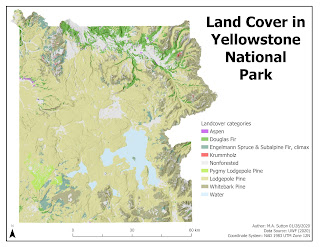
Design strategies employed while making this map included the following: Typology: Tahoma font was selected with the sizing scaled from 36 pt for the title to make it the most prominent, to 10 pt for the map supplemental information in the bottom right corner (to make it less prominent). Neatline : The neatline was drawn around the entire map area instead of the map frame to reduce whitespace overall when placing the remaining essential map elements. A border around the map frame would have made such placement less possible, with more whitespace overall around the east side of the plotted area near the jagged terrain. Color: Nonforested areas were colored gray to make them less prominent. Shades of green were selected for the Pine family of land cover, with the largest area (Lodgepole Pine) selected with lighter shading to be of sufficient visual contrast with the white background, while still falling within the hierarchical organization overall to indicate all landcover categ...

Lab 2 [GIS 6005]: Coordinate Systems

Image
The State of Wisconsin is shown above to demonstrate the appropriate selection of a coordinate system before analyzing additional attributes for a map. The State of Wisconsin falls with 3 state planes and 2 UTM zones, and thus requires the use of a custom coordinate system. The NAD 1927 Wisconsin TM (Meters) coordinate system was selected for this reason. It would not be appropriate to use either the state plane nor the UTM-based coordinate systems for this state because at best these coordinate systems would be optimal for only 33% (state plane-based) to 50% (UTM-based) of the state.

Lab 1 [GIS6005]: Map Design & Typography

Image
Recreational Areas near Austin, Texas This map highlights the importance of five design features that improve map communication: visual contrast, legibility, figure-ground organization, hieararchical organization, and balance. Visual contrast was created in this map by decreasing the shade of the Travis County area relative the symbology for main features noted in the legend. In addition, the shade used for Travis County is visually distinct from the white background used for the overall map. Legibility was achieved by carefully choosing border widths for the symbology of golf courses and hydrography. This makes most of the golf courses appear as solid areas and allows for both larger and smaller waterways to be visualized on the map. The symbol for the recreation centers was then selected to demonstrate this as a center of activity by using a circular choice for the symbol. Figure-ground organization was achieved in the inset map for the U.S. by using shading ...